Tables
Data Warehouse Tables
The ampEducator Data Warehouse organizes your institution's data into a curated set of reporting tables designed specifically for analytics and business intelligence.
Rather than exposing the hundreds of tables that power the day-to-day operation of ampEducator, the Data Warehouse presents the information most commonly used for reporting in a simplified structure. This makes it significantly easier to build SQL queries, dashboards, and reports without needing an in-depth understanding of the application's internal database.
How the Data Warehouse is Organized
The Data Warehouse currently includes 17 reporting tables, covering the major functional areas of ampEducator, including:
- Students
- Prospects
- Programs
- Courses
- Enrolments
- Attendance
- Grades
- Financials
- Instructors
- Student Activity
Each table has been designed to represent a specific area of your institution while maintaining relationships with the other reporting tables.
How the Tables Relate
Most reports begin with a student and expand outward by joining related information from other tables.
The diagram below provides a high-level overview of how the Data Warehouse tables relate to one another. Most reports begin with the dw_students table and join additional tables such as enrolments, attendance, grades, financial summaries, and courses depending on the information being analyzed.
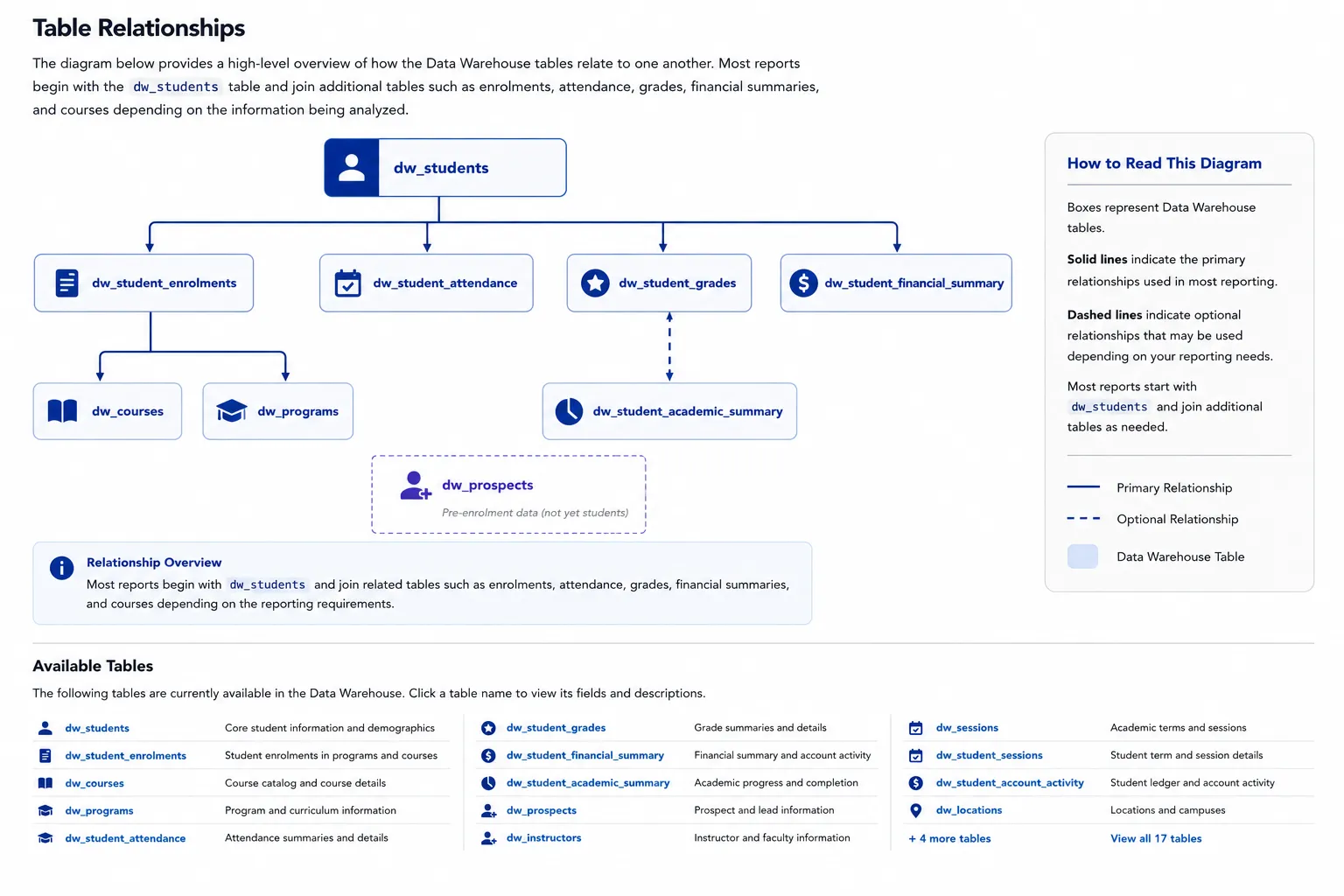
For example, you might begin with a list of students, then join:
- Enrolments to determine which programs they're in
- Attendance summaries to monitor participation
- Grade summaries to review academic performance
- Financial summaries to identify outstanding balances
This structure makes it easy to answer questions such as:
- Which students are currently at risk?
- Which programs have the highest completion rates?
- Which students have poor attendance and outstanding balances?
- What are the average grades by instructor or course?
Nightly Data Refresh
The Data Warehouse is refreshed automatically each night.
Changes made throughout the day—including new students, enrolments, attendance, grades, financial transactions, and other activity—are processed overnight and made available the following day for reporting.
This allows the reporting database to remain optimized for analytics without impacting the performance of the live ampEducator system.
Curated for Reporting
The Data Warehouse is intentionally designed as a reporting database rather than a direct copy of the live ampEducator database.
Only the data most commonly required for reporting and business intelligence has been included. This keeps the tables easier to understand, improves query performance, and reduces unnecessary complexity.
If there is additional reporting data that would benefit your institution, please contact ampEducator Support. We continually review requests for additional reporting fields and tables.
Available Tables
The following sections describe each Data Warehouse table, its purpose, and the fields it contains.
dw_students
Description: Master list of students and prospects, including core personal details, contact information, and current program.
When to use: Use this table for general student information and as a starting point for most reports.
Key fields
- student_key: Unique identifier used to join across tables
- student_type: Prospect or enrolled student
- name, email, phone: Contact details
- location_name: Assigned location
- current_program_name: Current program
- current_program_status: Program status
dw_prospects
Description: Admissions data for prospects, including lead stages, sources, and assigned advisors.
When to use: Use for admissions tracking, lead analysis, and conversion reporting.
Key fields
- student_key: Prospect identifier
- lead_stage: Current stage
- source: Lead source
- admission_advisor: Assigned advisor
- expected_program_name: Intended program
- is_converted_to_student: Conversion indicator
dw_prospect_stage_history
Description: Timeline of prospect stage changes throughout the admissions funnel.
When to use: Use for funnel analysis, conversion rates, and time-in-stage reporting.
Key fields
- student_key: Prospect identifier
- stage: Funnel stage
- entered_at, exited_at: Stage timing
- time_in_stage_days: Duration in stage
dw_courses
Description: Course-level data including schedule, enrollment, and performance metrics.
When to use: Use for course reporting and performance analysis.
Key fields
- course_key: Course identifier
- course_name: Course name
- course_start, course_end: Timeline
- num_enrolled, num_completed: Enrollment metrics
- course_percentage_average, course_gpa_average: Performance
dw_course_instructors
Description: Mapping of instructors assigned to courses.
When to use: Use to analyze instructor workload and course assignments.
Key fields
- course_key: Course identifier
- instructor_name: Instructor name
- is_primary: Primary instructor flag
dw_instructors
Description: Instructor information including contact details and status.
When to use: Use for instructor reporting and staffing analysis.
Key fields
- instructor_key: Unique identifier
- full_name, email: Contact details
- location_name: Assigned location
- status: Active or inactive
dw_sessions
Description: Academic sessions or terms with associated dates.
When to use: Use to group or filter data by term.
Key fields
- session_key: Unique identifier
- session_name: Term name
- session_start, session_end: Timeline
dw_student_programs
Description: Student progress and performance within each program.
When to use: Use for program-level reporting and student outcomes.
Key fields
- student_key, program_name: Identifiers
- program_start_date, program_expected_end_date: Timeline
- grade_point_average, percentage_grade_average: Performance
- total_hours_completed, total_hours_missed: Attendance
dw_student_sessions
Description: Student performance summarized at the session (term) level.
When to use: Use for term-based academic reporting.
Key fields
- student_key, session_key: Identifiers
- credits_attempted, credits_earned: Progress
- completion_rate: Completion metric
dw_student_enrollments
Description: Student enrollments in courses, including status, grades, and attendance.
When to use: Use for course-level student analysis.
Key fields
- student_key, course_key: Identifiers
- start_date, end_date: Timeline
- is_active, is_completed, is_withdrawn: Status
- grade_point_average: Performance
dw_student_grades
Description: Detailed grade and assessment data.
When to use: Use for grading analysis and assessment-level reporting.
Key fields
- student_key, course_key: Identifiers
- grade_name: Assessment
- percentage, final_weighted_grade: Scores
- is_passed: Pass/fail indicator
dw_student_attendance
Description: Detailed attendance records per student.
When to use: Use for granular attendance tracking.
Key fields
- student_key, course_key: Identifiers
- attendance_date: Date
- attendance_status: Present, absent, or late
- attendance_hours: Hours attended
dw_student_attendance_summary
Description: Aggregated attendance metrics per student.
When to use: Use for high-level attendance reporting.
Key fields
- student_key: Identifier
- total_attended, total_absences: Counts
- total_hours_attended, total_hours_missed: Hours
dw_student_account_activity
Description: Transaction-level financial activity including charges and payments.
When to use: Use for detailed financial analysis.
Key fields
- student_key: Identifier
- activity_date: Transaction date
- activity_type: Type of activity
- amount: Transaction amount
dw_student_financial_summary
Description: Summary of student financial status including balances and aging.
When to use: Use for financial reporting and account health.
Key fields
- student_key: Identifier
- balance, balance_due: Financial totals
- balance_due_30_days, balance_due_60_days: Aging
dw_student_academic_summary
Description: High-level academic performance per student.
When to use: Use for quick academic summaries.
Key fields
- student_key: Identifier
- grade_point_average: GPA
- percentage_grade_average: Average grade
- academic_status: Standing
dw_student_overview
Description: Combined view of student data across academic, financial, attendance, and program areas.
When to use: Use for dashboards and reporting without needing joins.
Key fields
- student_key: Identifier
- student_status: Status
- current_program_name: Program
- balance, balance_due: Financial
- attendance_status: Attendance
- grade_point_average: Academic
dw_student_custom_fields
Description: Institution-defined custom student fields with column names reflecting each institution's configured field labels.
When to use: Use to query and analyze institution-specific student data alongside standard Data Warehouse tables.
Key fields
- student_key: Identifier
- Institution-defined custom field columns: Column names and data types vary by institution based on configured custom field definitions.
Common Joins
- student_key: Links student-related tables
- course_key: Links to course data
- session_key: Links to academic sessions
Next Steps
Learn how to use these datasets with sample queries:
You can also review:
- Overview