January
Invoice Changes (Drafts, Posting, Cancelling & Reissuing)
Release Date: January 26, 2026
Invoices now follow clearer, more structured rules to protect financial history.
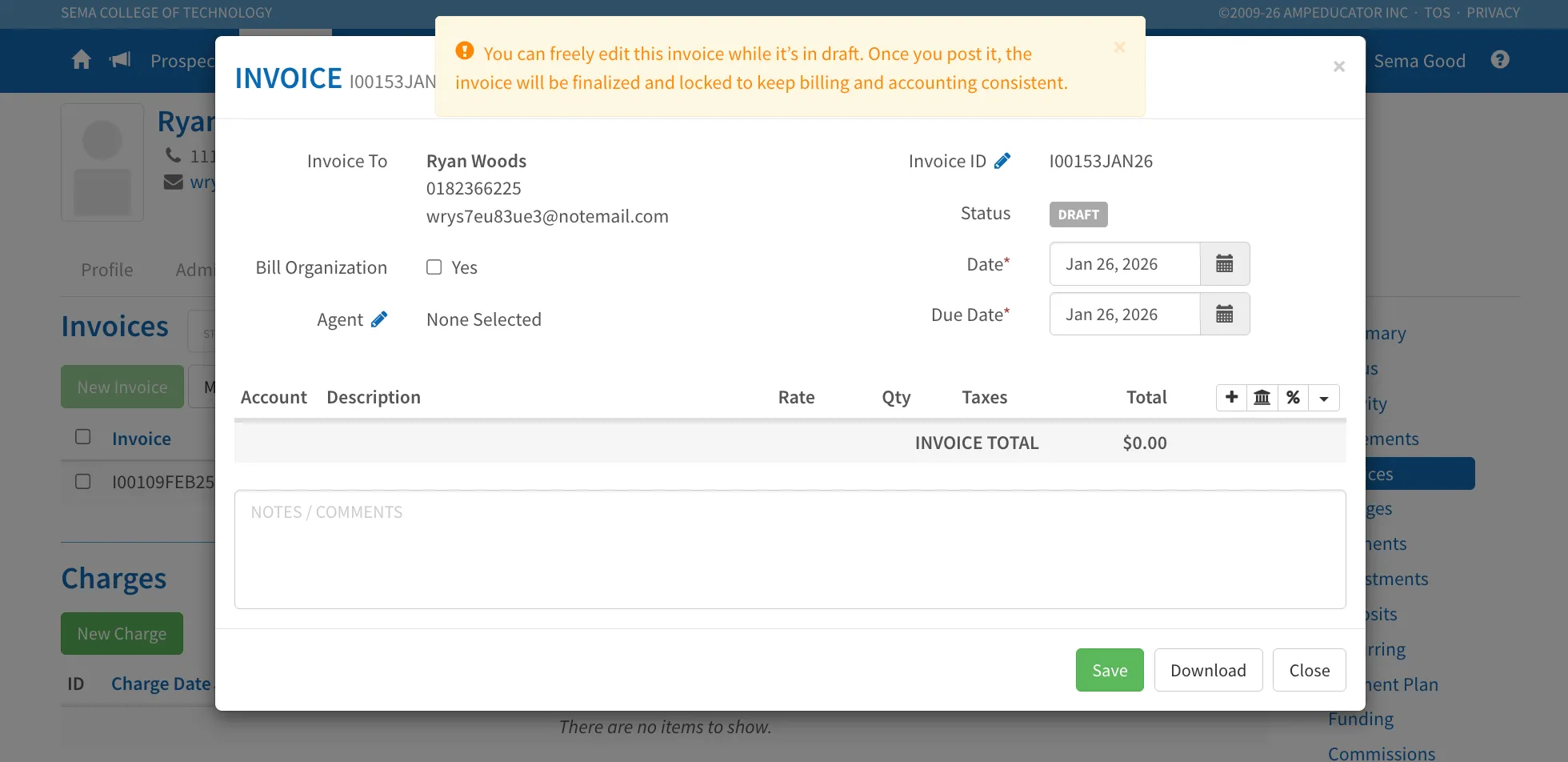
Draft Invoices
- Draft invoices can be edited or deleted.
- You can update items, discounts, agents, and commissions while an invoice is in Draft.
Posted Invoices
- Once an invoice is posted, it becomes finalized.
- Posted invoices cannot be edited or deleted. Individual items may be reversed where appropriate (see Reverse Invoice Item below).
Reverse Invoice Item
A new Reverse Item option has been added to posted invoices. Use Reverse Invoice Item when a specific charge on a posted invoice needs to be removed (for example, when a student drops a course or a single fee was added in error).
Reversing applies only to the selected line item. The invoice remains posted, associated payments are unapplied, tax deductions (if applicable) are reversed, and a credit is applied to offset the item. The action is one-way and cannot be undone.
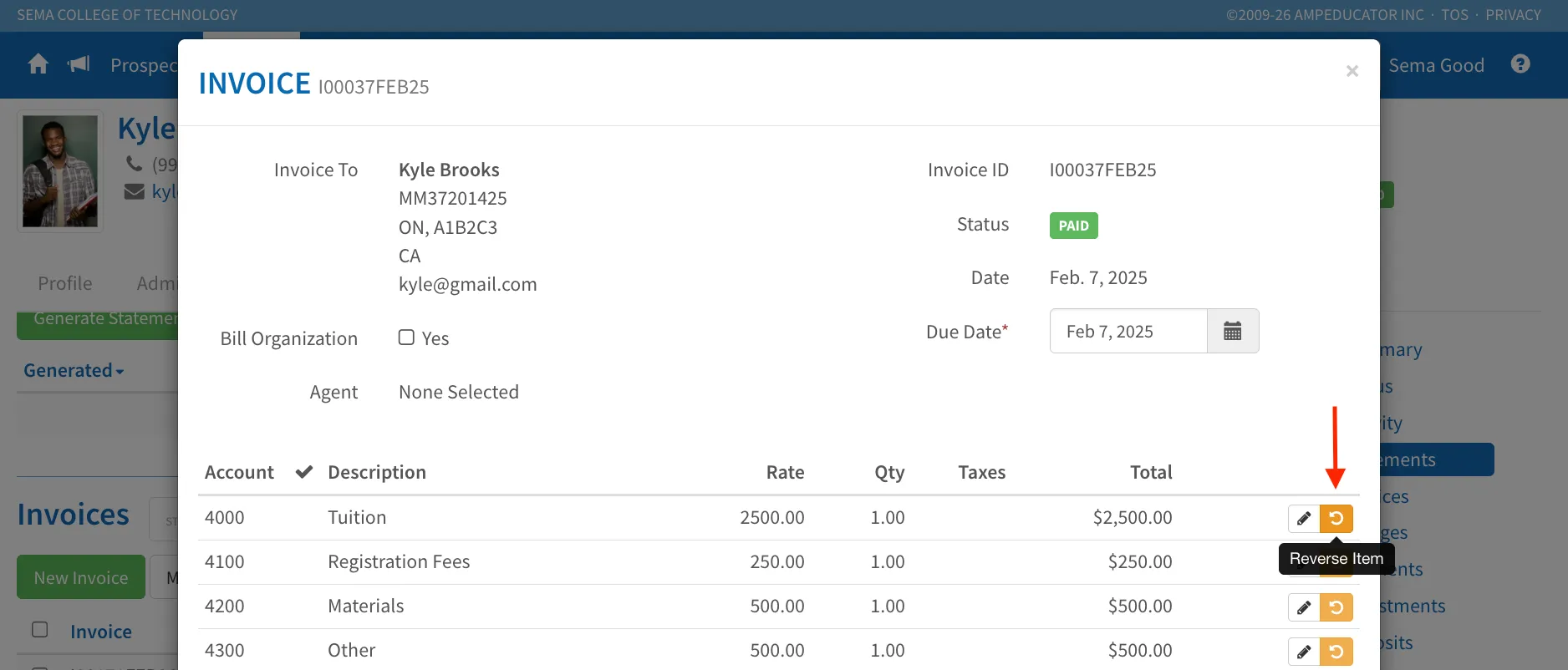
This allows institutions to reverse individual invoice line items without cancelling the entire invoice.
- The invoice must be within the Open Transaction Period.
- A reason for reversal is required.
- The action is one-way and cannot be undone.
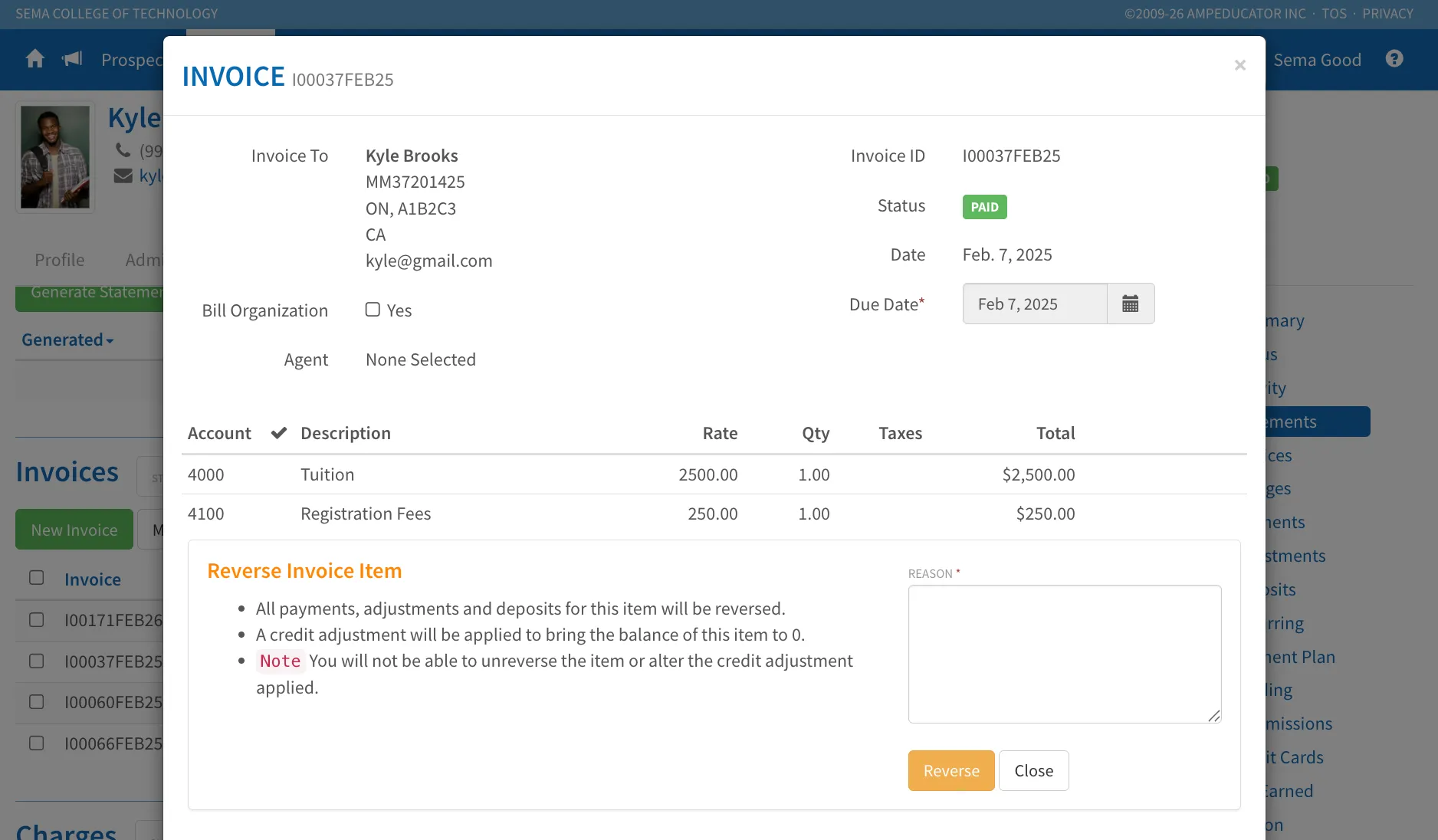
When an item is reversed:
- All associated payments, deposits, credits, and adjustments are unapplied.
- Any related Tax Deductions Earned are automatically reversed.
- A credit is applied to bring the item balance to $0.
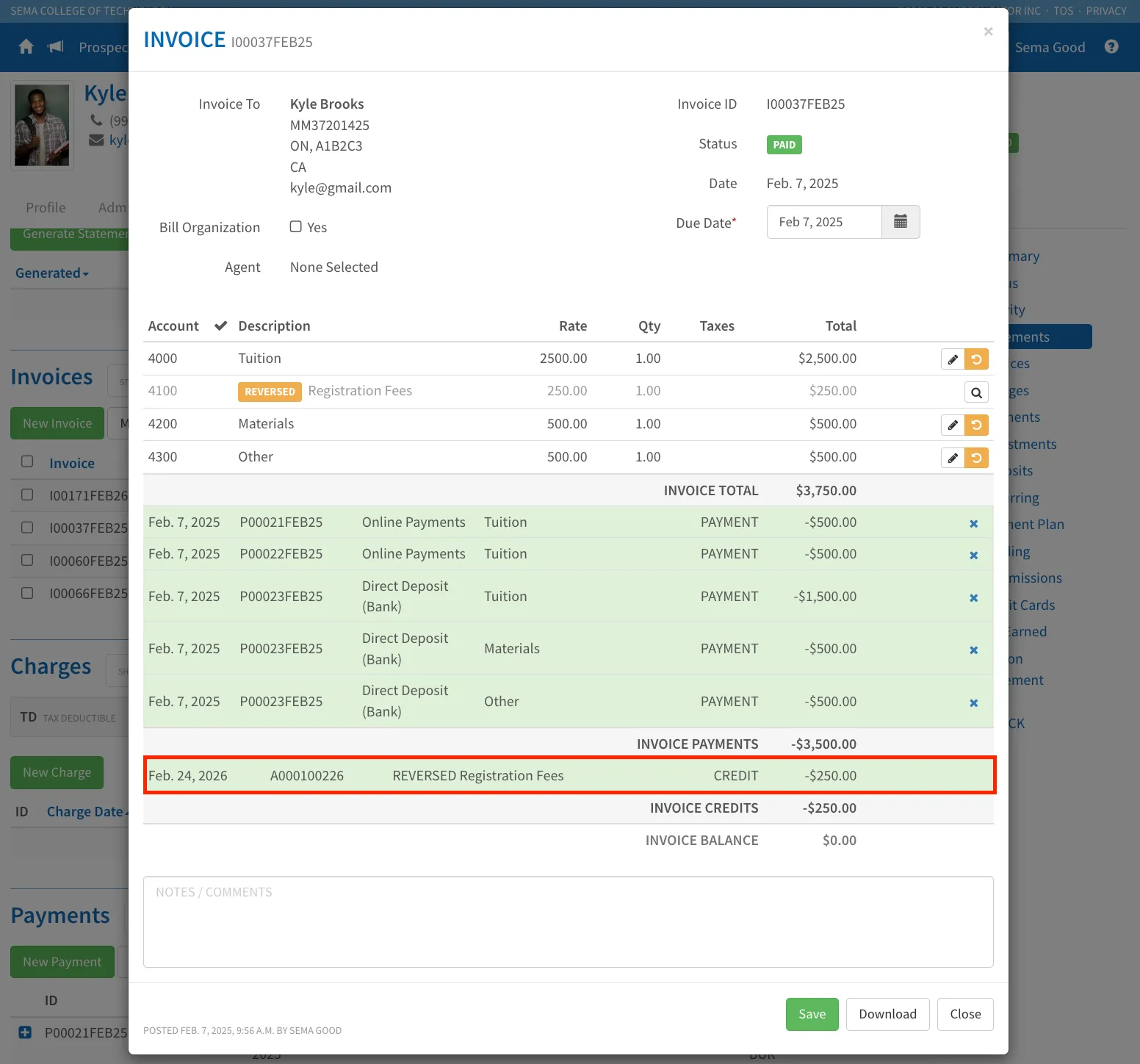
- The credit is locked and cannot be edited or deleted.
- The invoice line is marked as Reversed and greyed out.
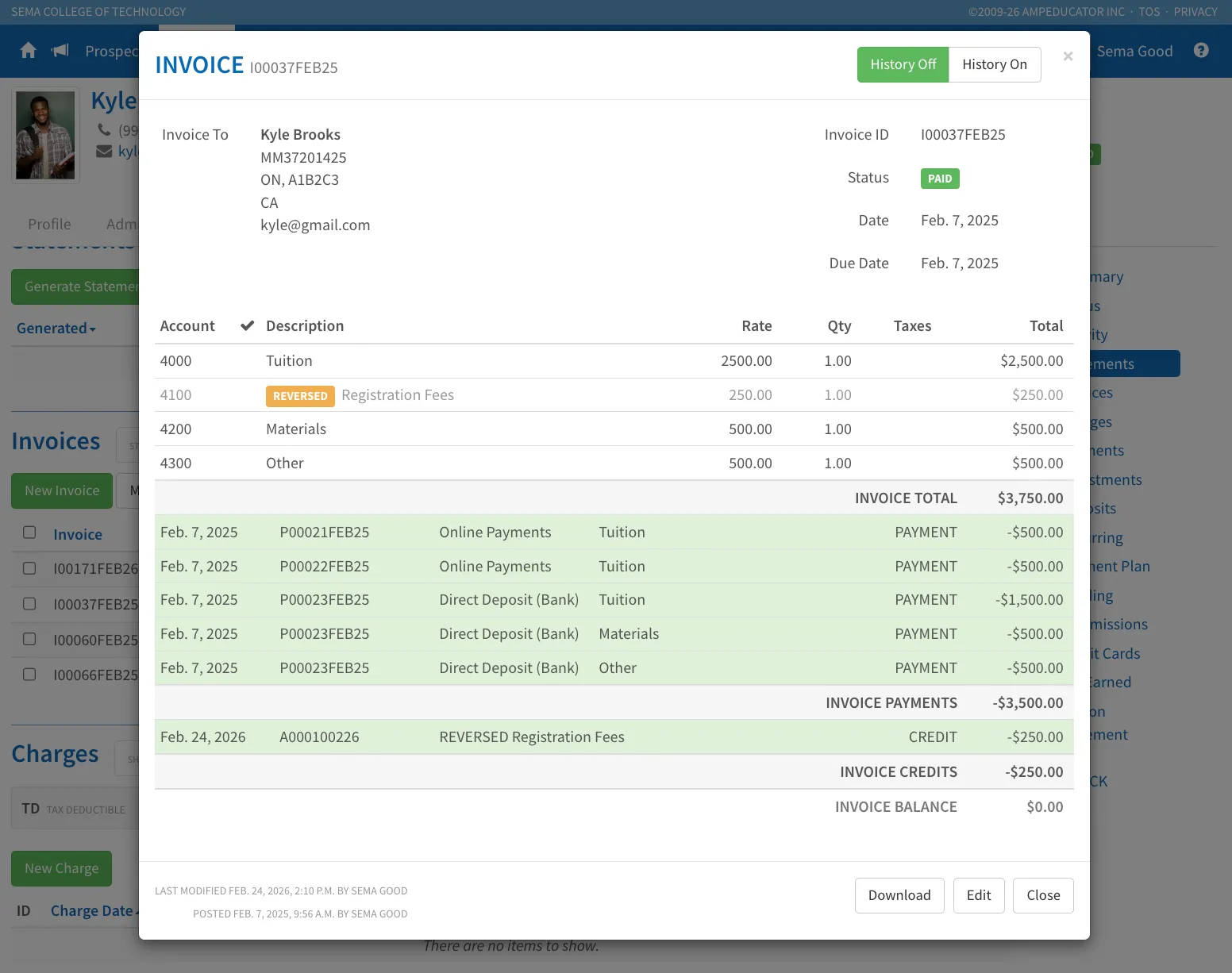
- The edit option becomes view-only.
- A warning banner appears when viewing the reversed item.
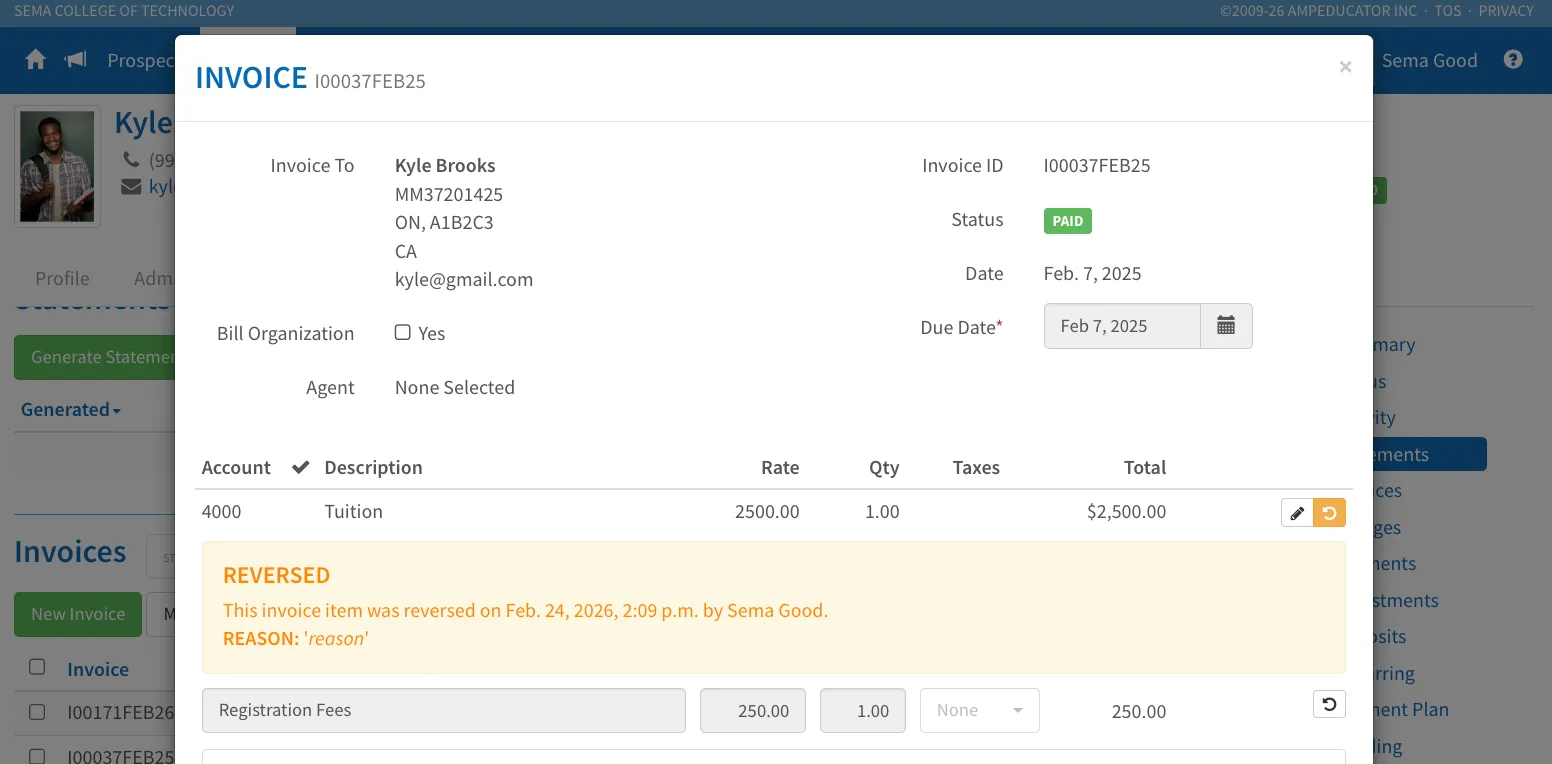
This provides a controlled and auditable way to correct individual invoice items while preserving financial history.
Cancelling & Reissuing
Use Cancel & Reissue when the entire invoice needs to be corrected or rebuilt (for example, if multiple items, discounts, or agent details were entered incorrectly).
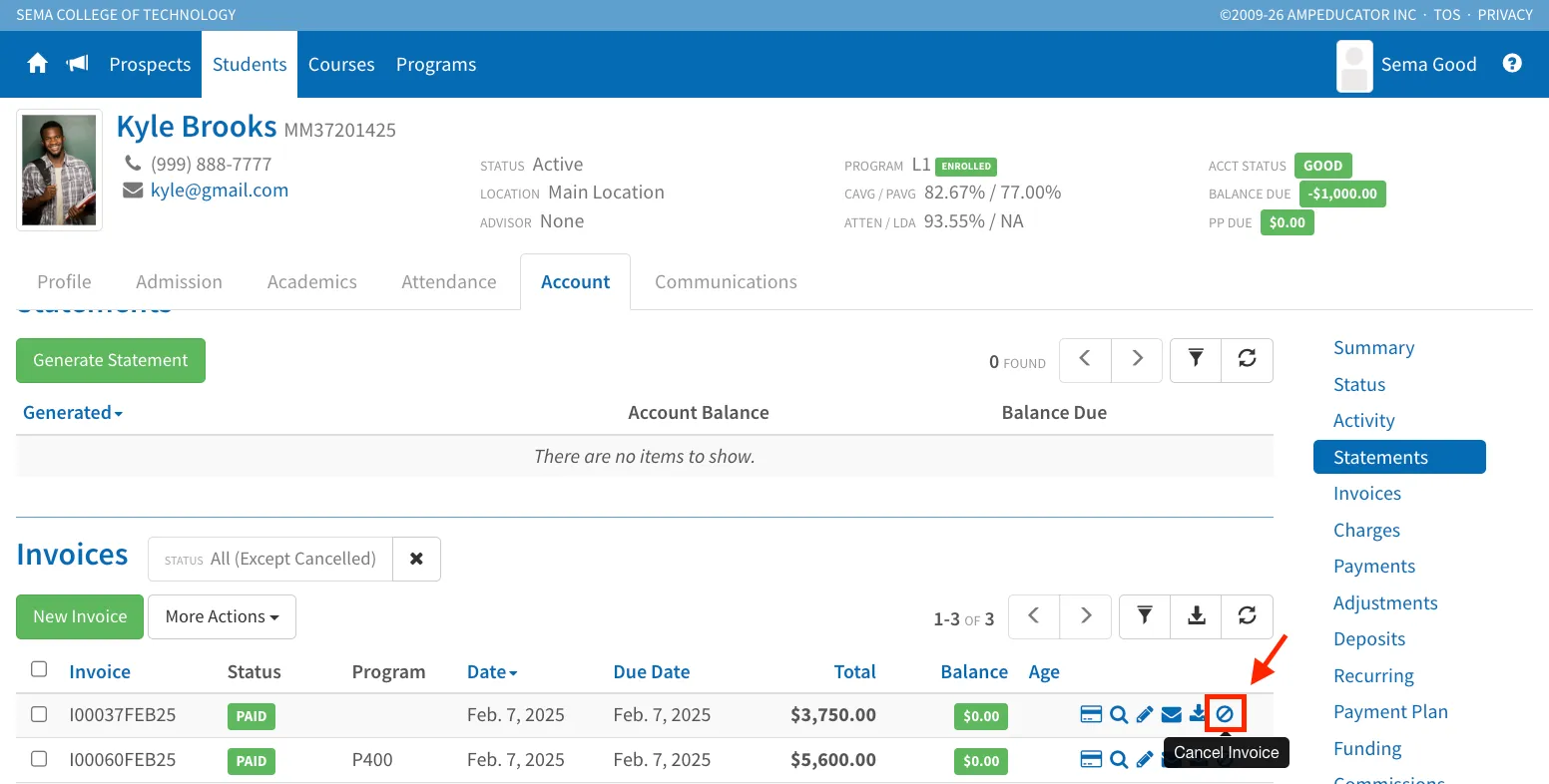
When cancelling an invoice, you now have the option to automatically Reissue the invoice at the time of cancellation.
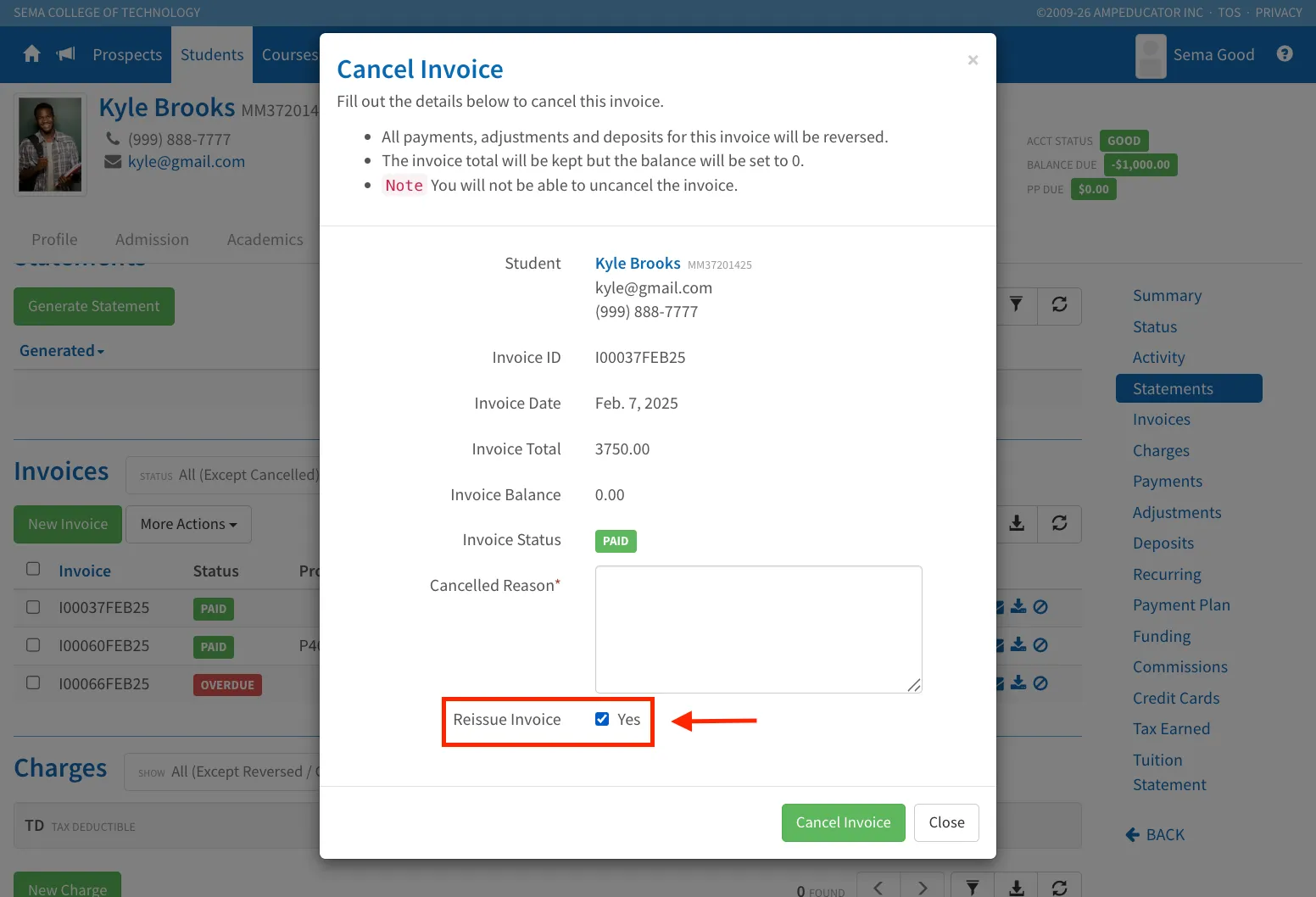
When Reissue is selected:
- The original invoice is cancelled
- A new draft invoice is automatically created using the same details
- Previously applied payments, credits, and deposits are carried forward into the new draft
The reissued invoice opens in Draft status, allowing you to:
- Review existing charges
- Make necessary edits
- Adjust items if needed
- Repost when ready
This streamlines corrections while preserving financial history and reducing manual reallocation work.
Account Charges (Cancel, Reverse & Lifecycle Controls)
Release Date: January 26, 2026
Account Charges now follow structured lifecycle rules similar to invoices. Charges can no longer be deleted and must be managed through controlled actions to preserve financial history.
Cancel Charge
Charges can be cancelled, but not deleted.
When a charge is cancelled:
- All applied payments, credits, and deposits are reversed
- The charge total remains for historical reference
- The balance is set to $0
- The charge becomes locked
- The charge cannot be uncancelled
If corrections are required, a new charge must be created.
This protects financial records while maintaining a clear audit trail.
Reverse Charge
The Reverse action allows a charge to be negated while preserving the original transaction.
When a charge is reversed:
- Applied payments, credits, and deposits are unapplied
- A credit entry is created to offset the charge
- The charge balance becomes $0
- Both the original charge and the reversal credit are locked
Unlike Cancel, Reverse keeps the original charge visible in history along with the offsetting negative credit.
Once reversed, no further modifications can be made.
Charge Editing Controls
Charges may still be edited, but financial amounts cannot be changed after creation.
You may update:
- Associated program
- Associated course
- Due date
- Notes
These restrictions ensure accounting integrity while allowing administrative adjustments.
Commission Handling & Settlement Improvements
Release Date: January 26, 2026
Commission processing has been updated to better align with real-world school workflows while maintaining audit integrity and tighter invoice lifecycle integration.
Commission Lifecycle & Invoice Integration
Commissions are now directly tied to invoice status:
- Invoice = Draft → Commission is Draft
- Invoice = Posted → Commission is Posted (visible for reporting)
- Invoice = Paid → Commission becomes Payable
Commissions may now be paid once the invoice is posted, rather than waiting until it is fully paid.
If a commission is paid before the invoice is fully paid, it will be marked with an Advance status. Once the invoice is paid, the commission automatically updates to Paid.
If an invoice is cancelled, any associated commissions are automatically cancelled.
This ensures commission status consistently reflects the state of the related invoice.
Deduct From Payment (Commission Offset)
When Deduct From Payment is enabled on an invoice:
- The student still pays the full invoice amount
- The agent retains their commission from that payment
- A Commission Offset is applied internally
- The invoice balance reflects the total minus the commission offset
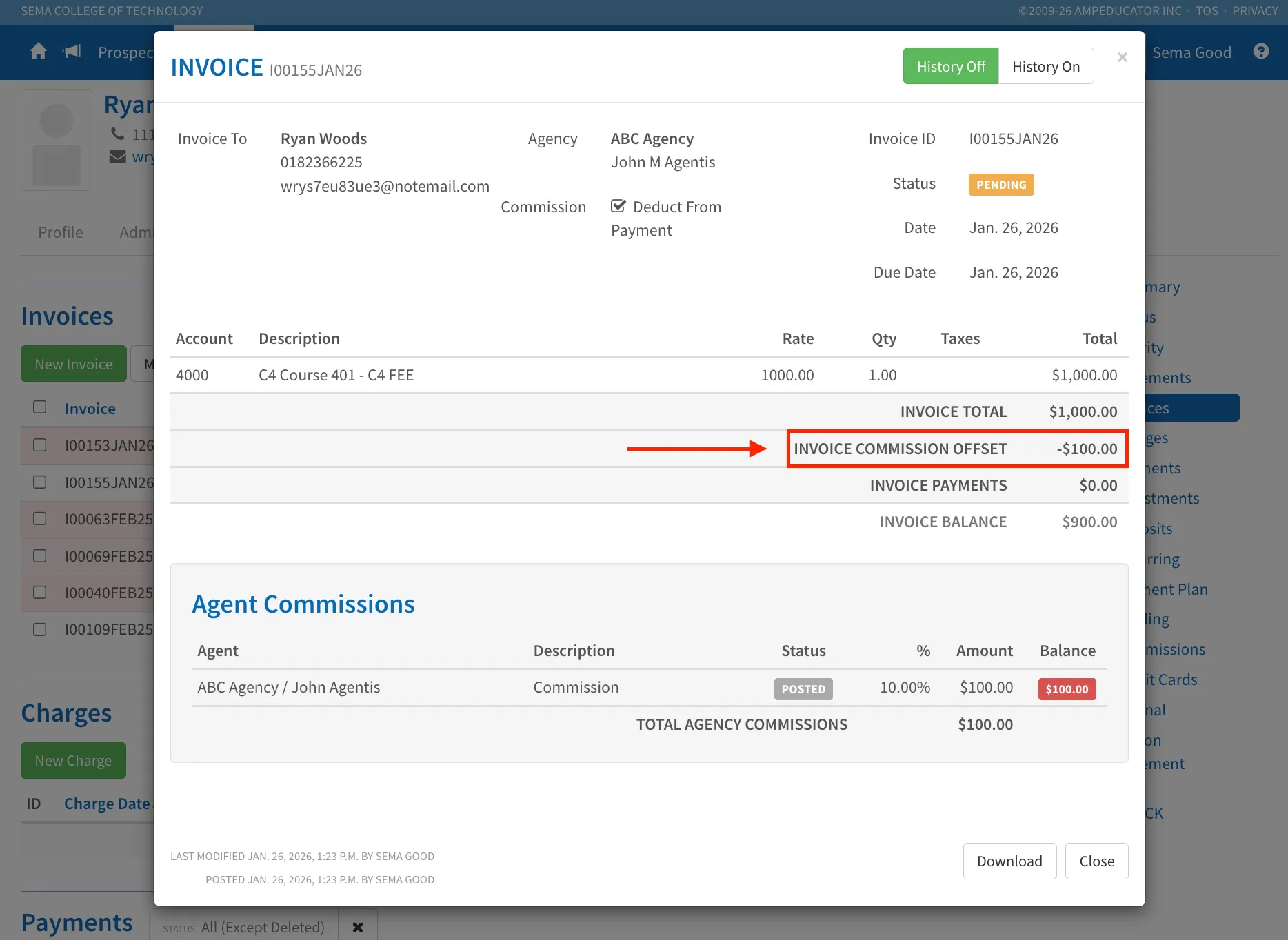
Commission offsets are handled internally and are never visible to students.
This simplifies reconciliation between schools and agencies while preserving clean student-facing records.
Automatic Commission Settlement
When an invoice is fully paid, the system automatically settles the associated commission by reducing its balance to zero.
This automatic settlement ensures that invoice payments and commission balances remain properly reconciled without requiring manual adjustments.
Manual Commission Settlement (Finalization & Locking)
A Commission Settlement option is available for cases involving partial payments or overpayments where the remaining balance is not expected to be paid or recovered.
When a commission is manually settled:
- An adjustment is applied to bring the balance to zero
- The commission status changes to Settled
- A “Settled” banner appears across the commission record
- The commission becomes locked
- Commission payments, refunds, and adjustments can no longer be modified
This provides a controlled way to permanently close out commission records while maintaining full audit history.
Commission Adjustments & Refunds
Commission Adjustments allow credits or debits to be applied directly to commission balances.
These are useful for:
- Partial refunds
- Corrections
- Cleanup of outstanding balances
Commission refunds now follow a Cancel / Reissue workflow rather than using delete, preserving financial history.
Commissions are no longer required to be linked to a student, allowing unassociated commissions when needed.
Commission Payment Controls
Commission payments have been enhanced for flexibility and audit protection.
You can now:
- Create a commission payment and apply it to one or multiple commissions
- Allocate a payment across multiple commission records
To protect financial history:
- Delete has been replaced with Cancel
- Cancelled commission payments cannot be uncancelled
- Cancelled payments may be Reissued, which creates a new payment using the same details
This ensures commission payment records remain structured, traceable, and auditable while still allowing corrections through a controlled workflow.
Student & Public Invoice View Updates
The student and public-facing invoice views have been updated to reflect the revised commission and settlement handling.
These changes ensure a clearer presentation of applied funds and maintain consistency between internal accounting and student-visible invoice details.
Credits, Refunds & Student Withdrawals (Best Practices)
Release Date: January 26, 2026
When a student withdraws from a course or program, credits are now the recommended method for handling refunds.
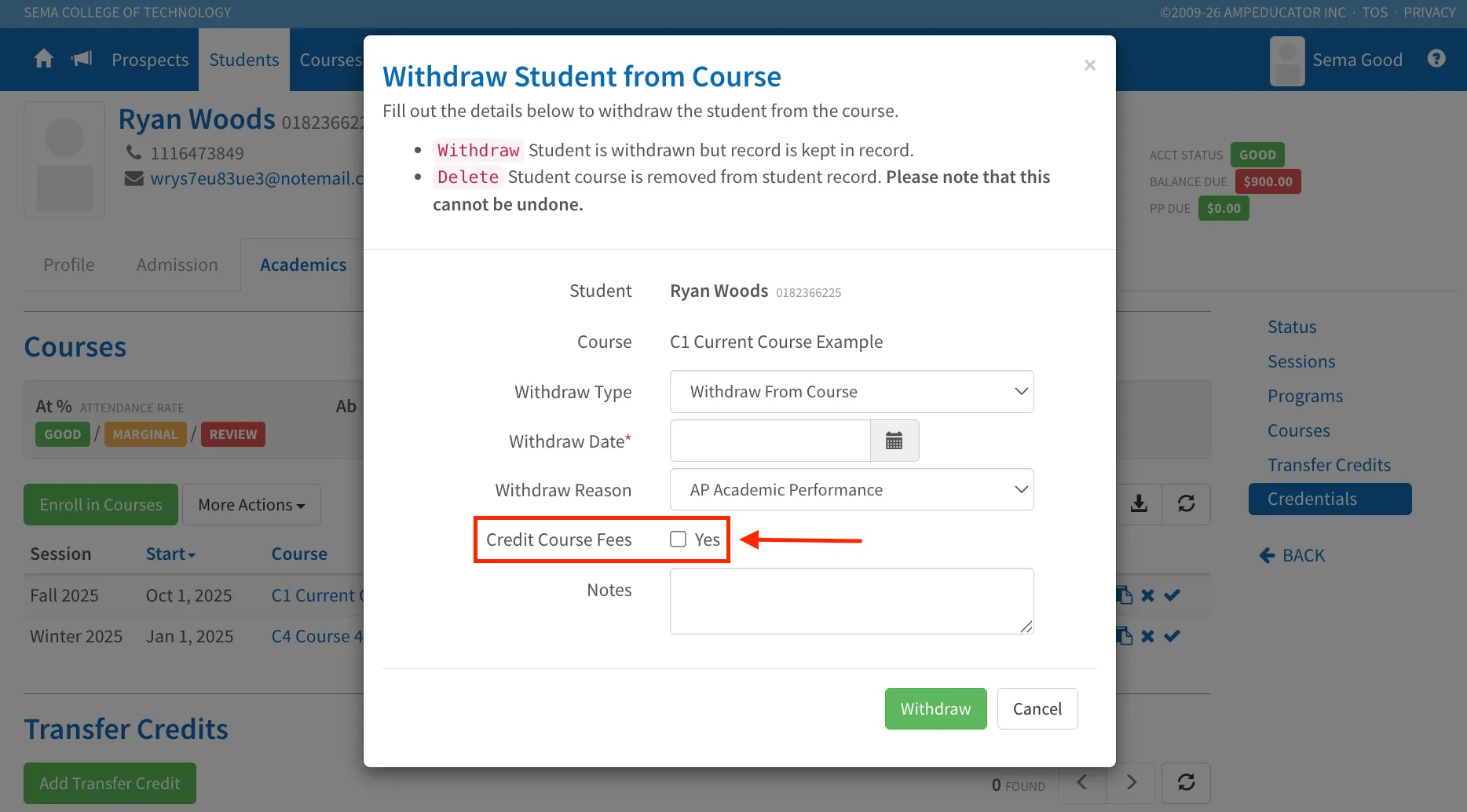
Credit Course Fees
- Use Credit Course Fees during withdrawal to credit the student instead of editing invoices or payments
- This preserves all invoice and payment history
- Keeps financial records clean and auditable
Refunding payments directly can unapply payments from invoices and create outstanding balances, which then require additional adjustments.
Credits can be:
- Applied to future invoices
- Refunded back to the student
- Refunded directly, allowing schools to apply a credit first and then process a refund without modifying historical invoices or payments.
- Credits can also be added manually from Adjustments → Add Credit
- Credit refunds can now be imported, making bulk refund processing easier
This aligns with standard accounting practices and avoids modifying historical invoices.
Course Tests: Security Warning Update
Release Date: January 26, 2026
Test security behavior has been updated to allow more flexibility while maintaining integrity.
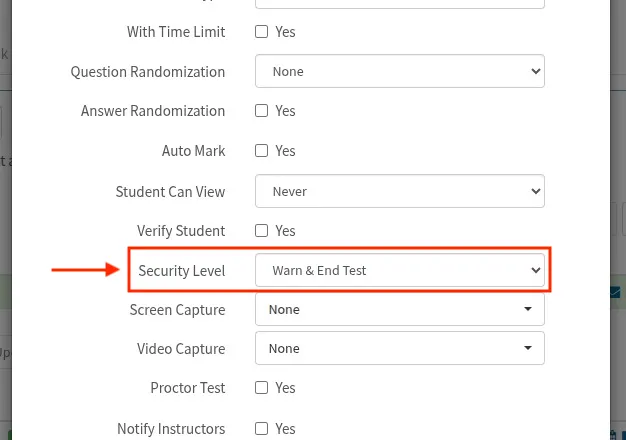
When Warn & End Test is enabled:
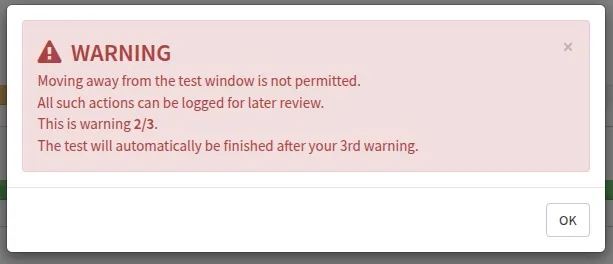
- Students now receive up to 3 warnings if they lose focus (e.g., switch tabs)
- After the third warning, the test automatically ends
When rescheduling a test:
- You can now choose to clear test security events
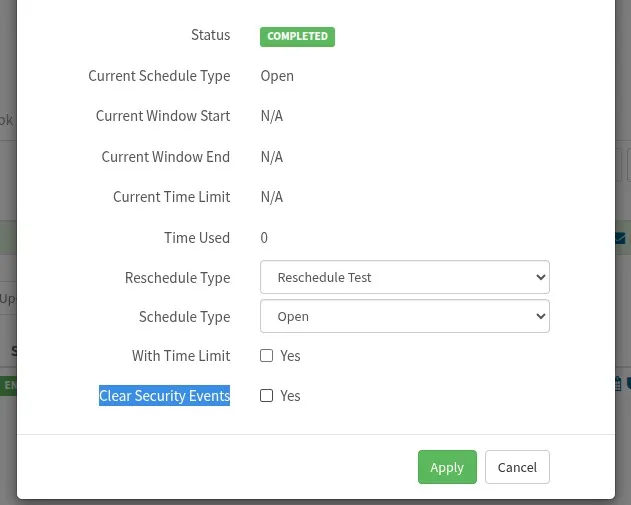
Security events are automatically cleared when a test is reset