December
Billing & Notification Enhancements
Release Date: December 16, 2025
We’ve introduced a couple of updates focused on improving billing clarity and automated payment reminders within ampEducator.
New Merge Fields for Balances
Two new merge fields are now available for use in email and PDF templates: Student.BalanceDueCurrent and Student.BalancePPDueCurrent.
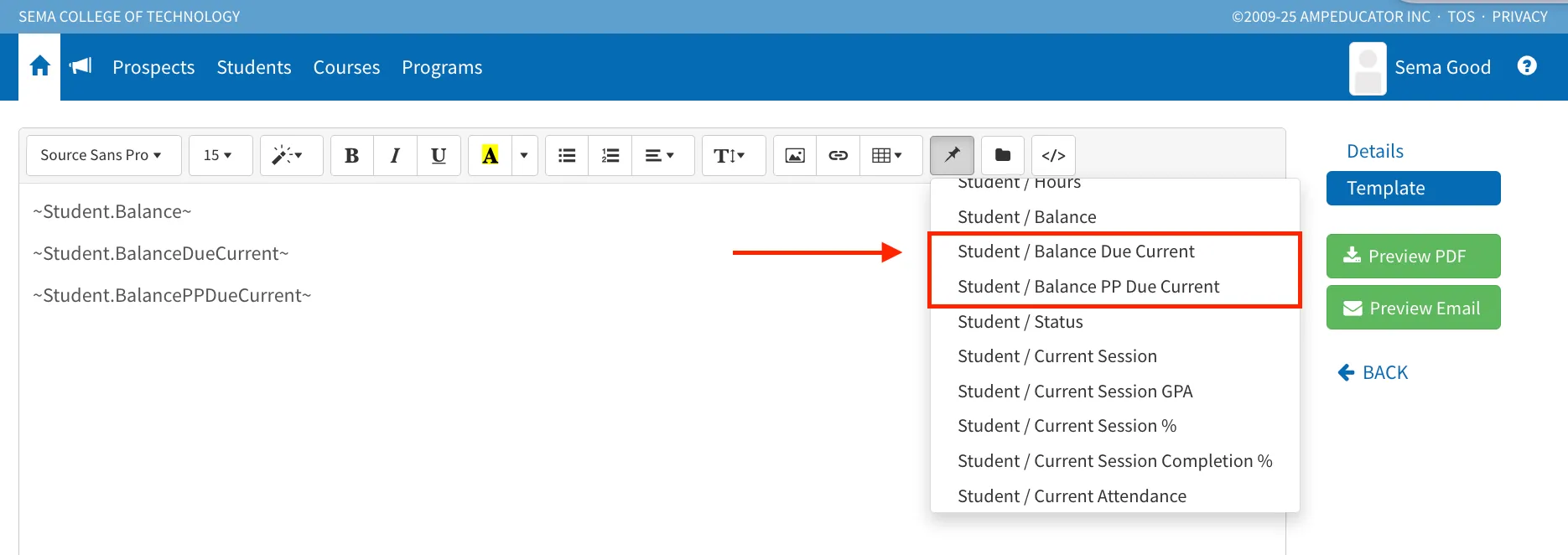
These fields dynamically display the student’s currently due balance and the currently due payment plan amount, allowing for clearer and more accurate financial communication.
Payment Plan Item Overdue Reminders
Automated overdue reminders can now be sent for Payment Plan Items, in addition to existing charge and invoice reminders.
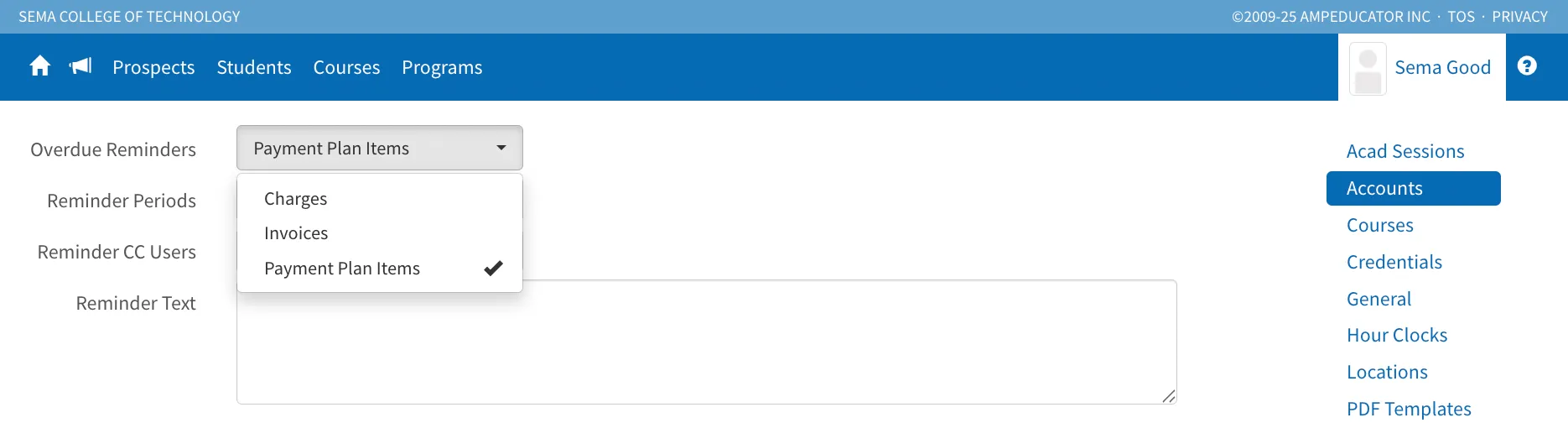
Institutions can select Payment Plan Item as the reminder type to notify students when payment plan items are overdue or becoming due, helping improve payment follow-up and consistency.
Student Forms View
Release Date: December 15, 2025
We’ve introduced a new Student Forms tab under Forms to make it easier to track and manage student form activity.
This new view displays all instances of student forms in one centralized location, separate from Public Submissions. Staff can quickly search by student, filter by form status, and monitor the progress of submitted forms without switching between screens.
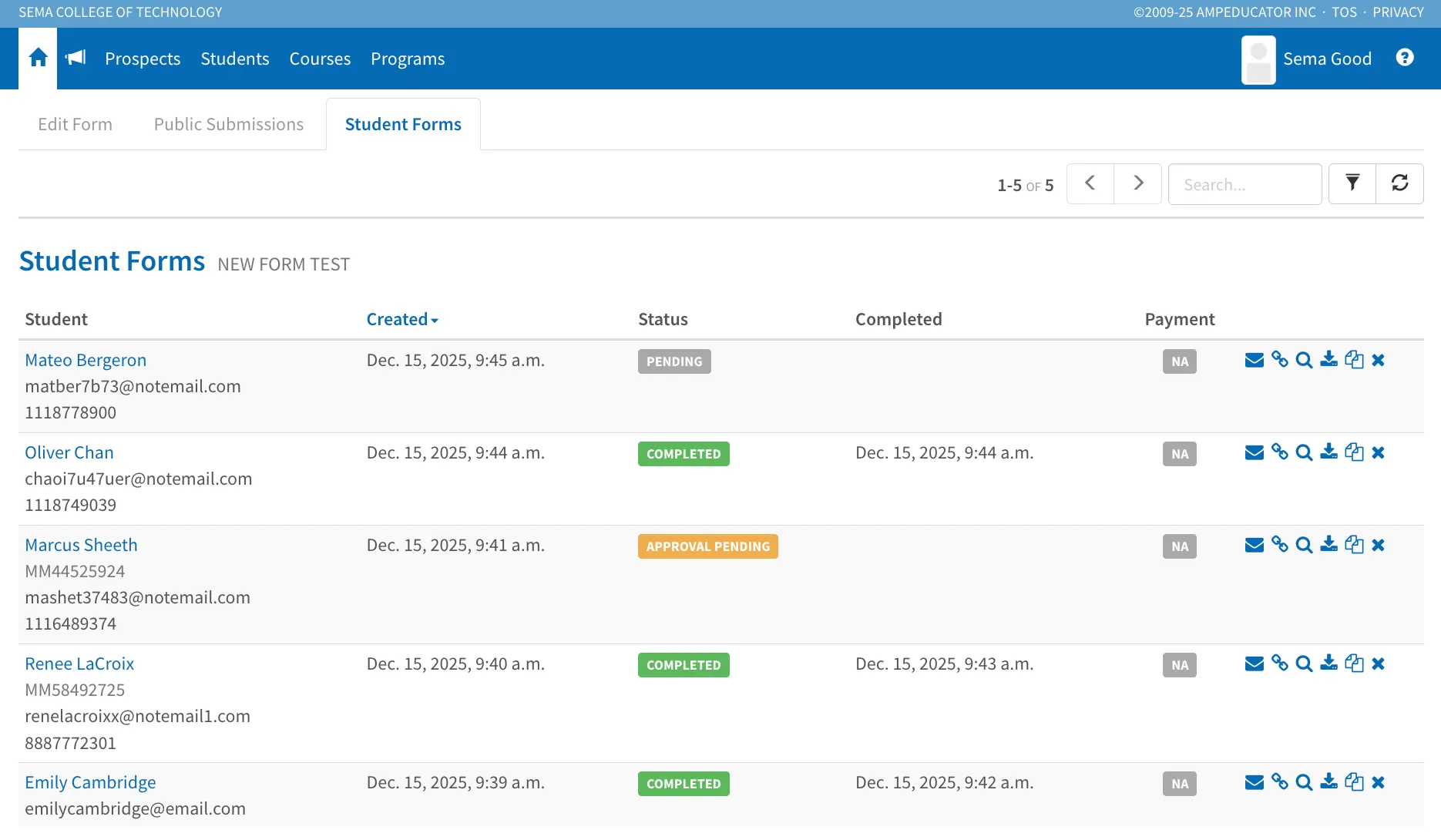
From the Student Forms view, you can perform all standard form actions, including emailing form links, viewing submissions, previewing forms, downloading copies, copying form field data, and deleting forms when needed. This update is designed as a convenience and visibility improvement, helping teams stay on top of form workflows more efficiently.
System Performance & Workflow Enhancements
Release Date: December 11, 2025
We’re excited to share several new improvements across ampEducator designed to make workflows faster, clearer, and more efficient. These updates enhance grading, attendance, job processing, and overall system responsiveness—especially for institutions with larger student volumes.
User Job Queueing Improvements
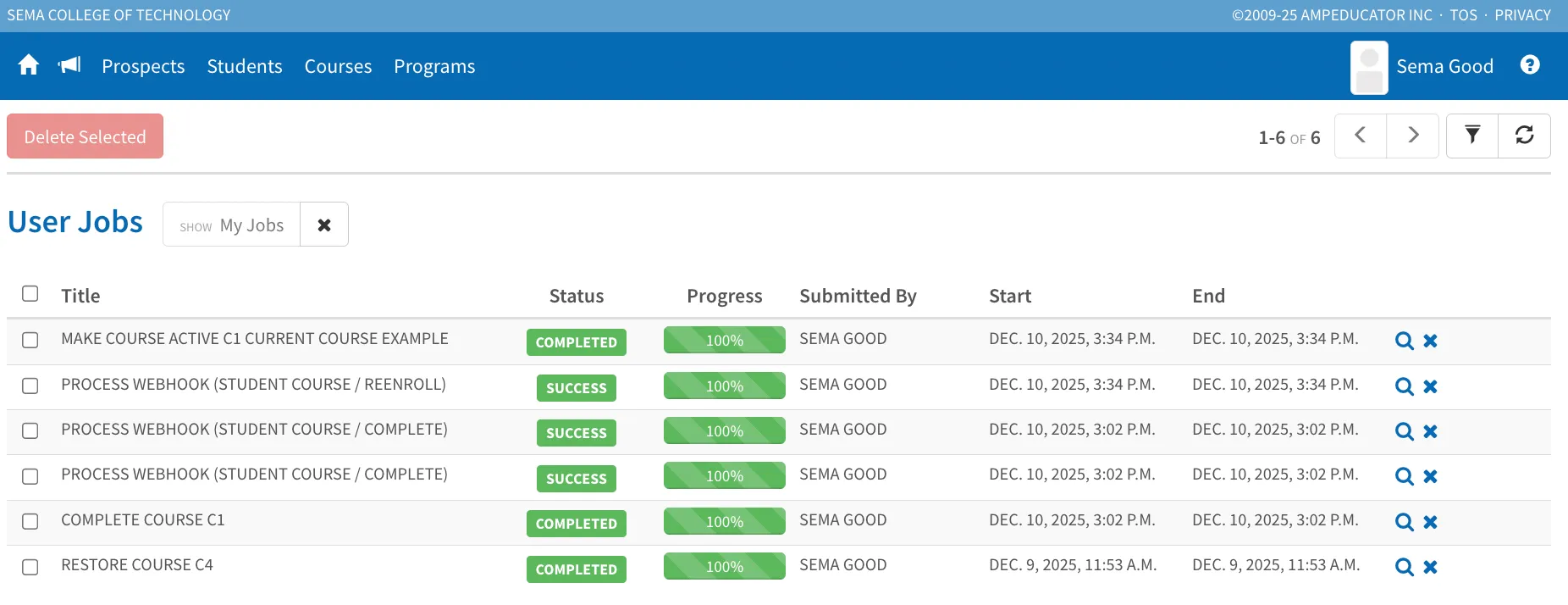
Jobs now run through a new queueing system that processes tasks one at a time, improving performance and reducing server load. Each queued job now displays its progress and position in the queue. We’ve also added a My Jobs filter so you can easily view the tasks you initiated, along with Visibility options to keep system-level jobs hidden unless needed.
Faster Gradebook, Course Students, and Attendance Pages
We’ve optimized several core areas of ampEducator to handle larger course sizes more efficiently. Gradebook, Course Students, and Attendance pages now load significantly faster, even for courses with hundreds of students. Updates to grades and attendance are processed more efficiently, resulting in a smoother, more responsive user experience.
Recalculation Indicator for Grades & Attendance
When a grade or attendance value is updated, ampEducator now provides immediate visual feedback while recalculations run in the background. A small glowing indicator appears beside values that are currently being updated. Once recalculation is complete, the final number is automatically refreshed. This indicator appears throughout the system wherever grade or attendance totals update.
Grade Limit Removed
We’ve removed the previous limit of approximately 60 grades per course. Courses can now support any number of grade items without impacting performance, thanks to backend improvements that handle grade data more efficiently.
General Performance Enhancements
Additional background improvements help ensure faster interactions throughout the platform. These updates reduce bottlenecks, streamline data processing, and provide a more consistent experience for schools of all sizes.
New Feature: Auto Withdraw
Release Date: December 11, 2025
A new Auto Withdraw option has been added to course enrollments. This allows the system to automatically withdraw a student from a course on a specified date.
When enrolling a student into a course, you’ll now see an Auto Withdraw field. If you select By Manual Date, it will require a withdraw date and reason.
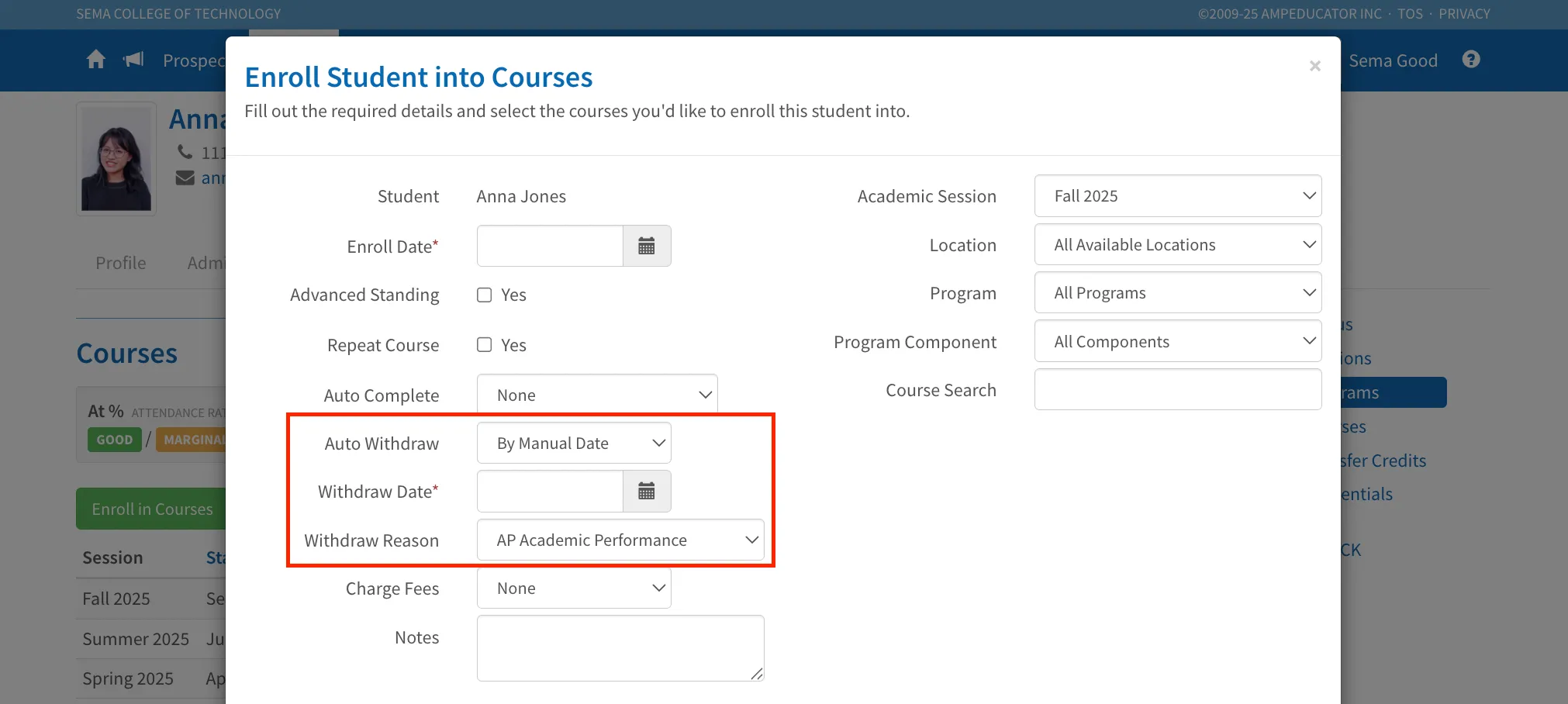
On the selected date, the system will automatically withdraw the student. (The automated job runs early each morning EST.)
Auto Withdraw settings can also be applied or updated by editing an existing enrollment under: Students → Courses → Edit Student Course
This new feature is especially useful for programs where students must complete within a set timeframe. If not completed manually, the system will withdraw them automatically to help manage enrollment-based costs.
Cancel Invoice Feature
Release Date: December 11, 2025
We are excited to introduce a new enhancement to ampEducator’s financial management tools: the ability to Cancel Invoices. This feature offers improved accuracy, transparency, and control when managing student billing.
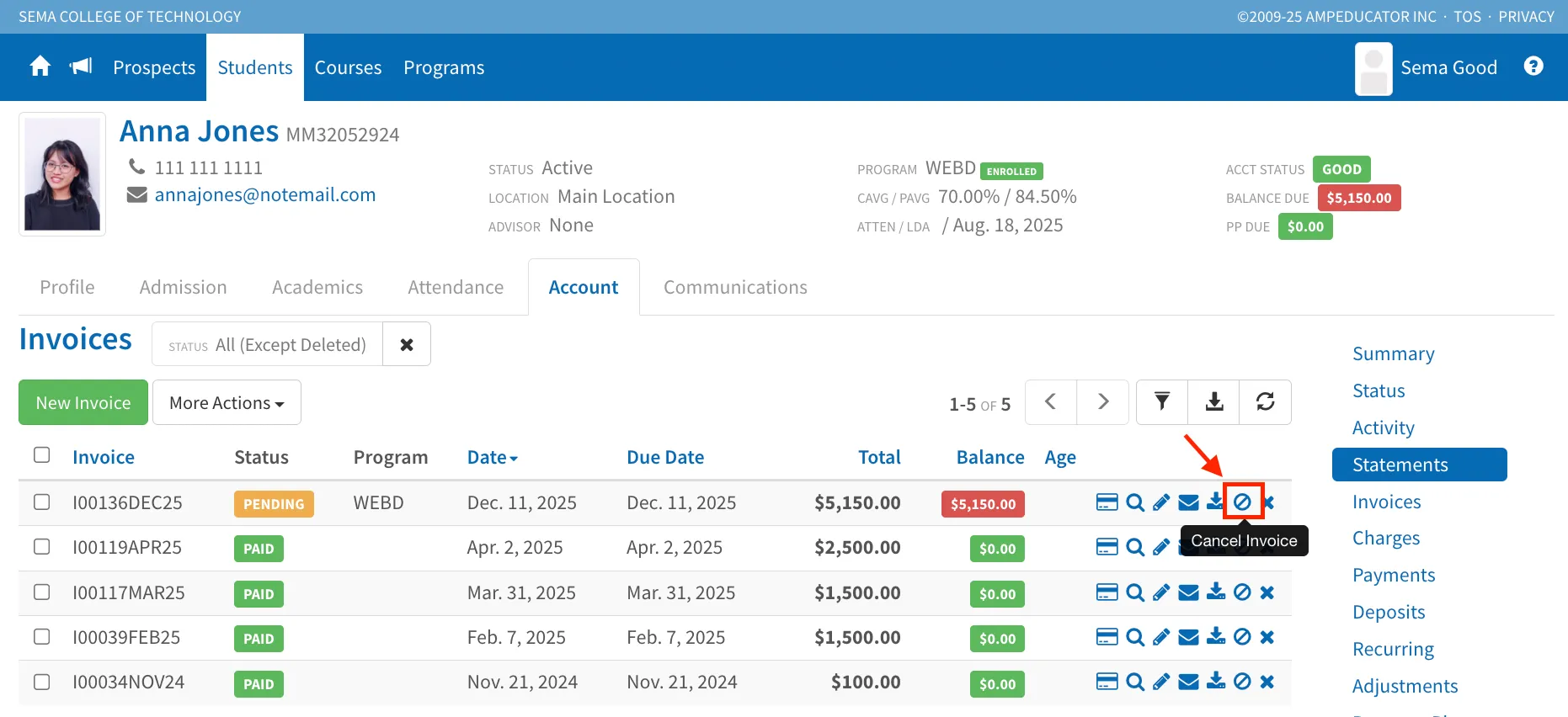
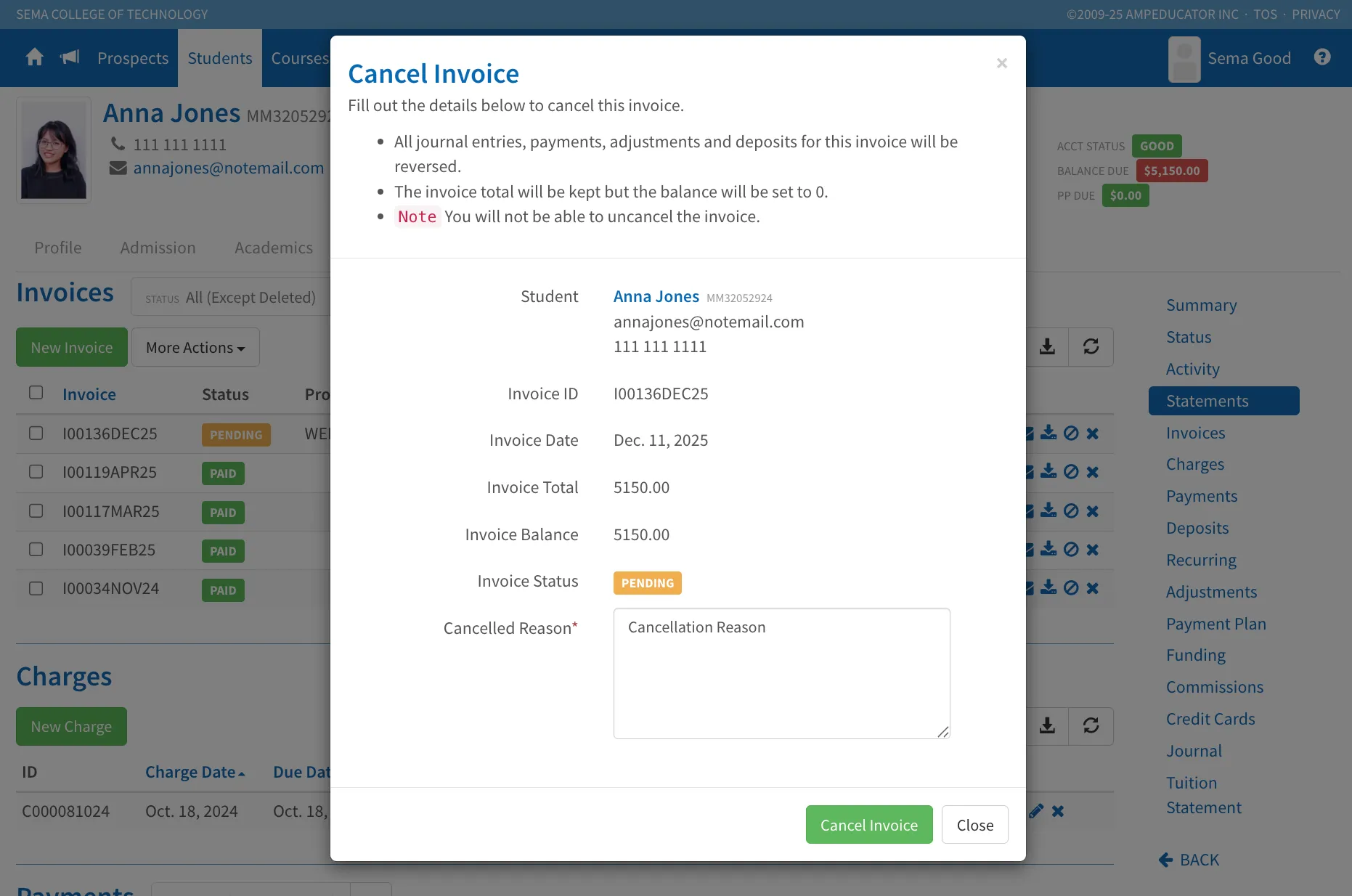
Users can now cancel an invoice instead of deleting it. Cancelling an invoice is permanent and cannot be undone. When an invoice is cancelled, all related journal entries, payments, adjustments, and deposits are automatically reversed, and the invoice balance is set to 0.00. A cancellation reason is required, ensuring a clear audit trail and better historical tracking.
Cancelled invoices remain fully viewable in the system. A red “Cancelled” banner is displayed on the invoice page and is also included on all generated PDF versions, providing clear visibility and transparency for both staff and students.
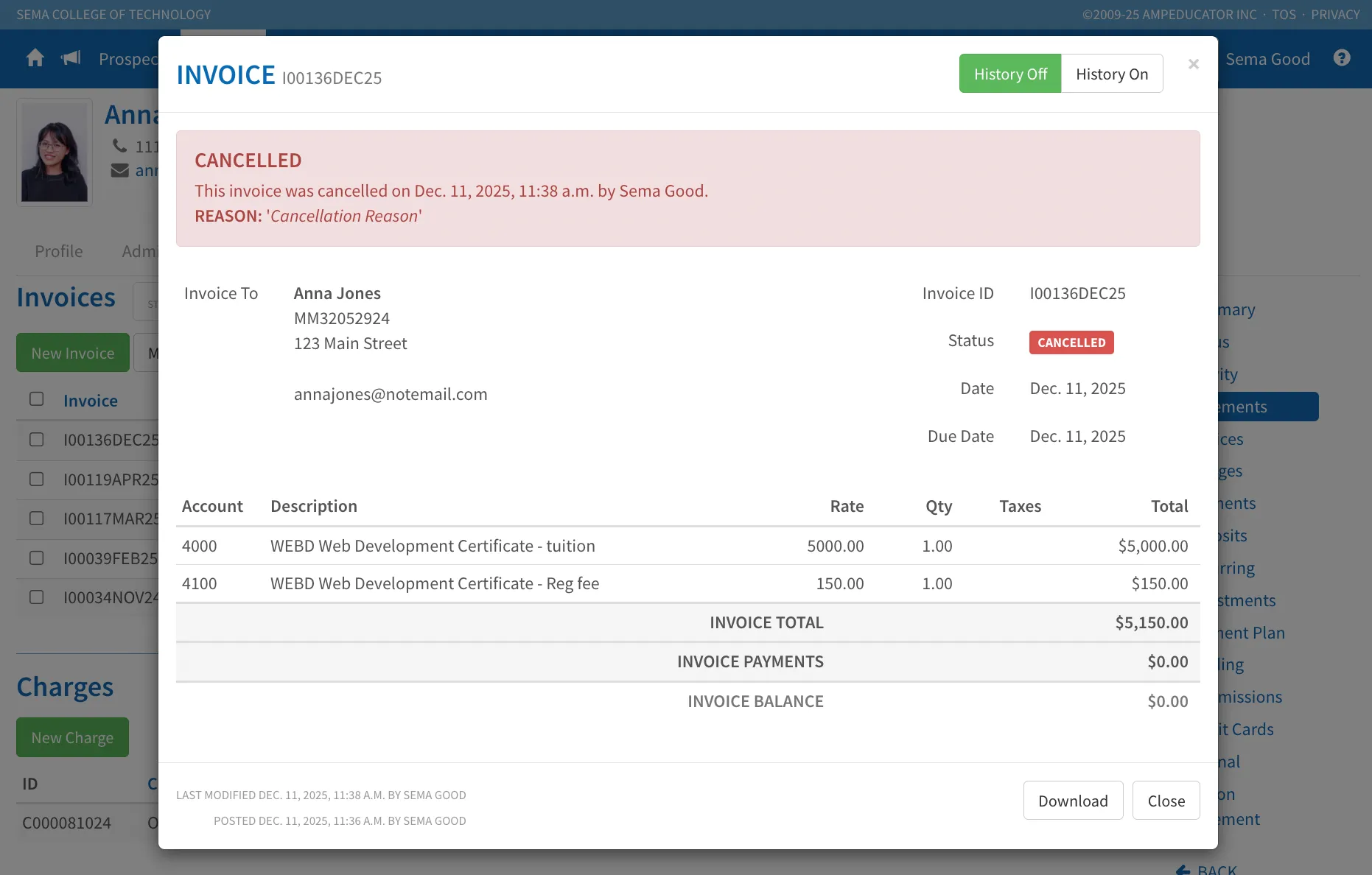
All invoice details, items, and totals remain accessible for reference, even though the balance has been zeroed.
New Attendance Calculation Option: Weighted by Course Hours
Release Date: December 8, 2025
We’ve added a new attendance averaging option called Weighted by Course Hours to provide schools with more accurate and flexible attendance calculations.
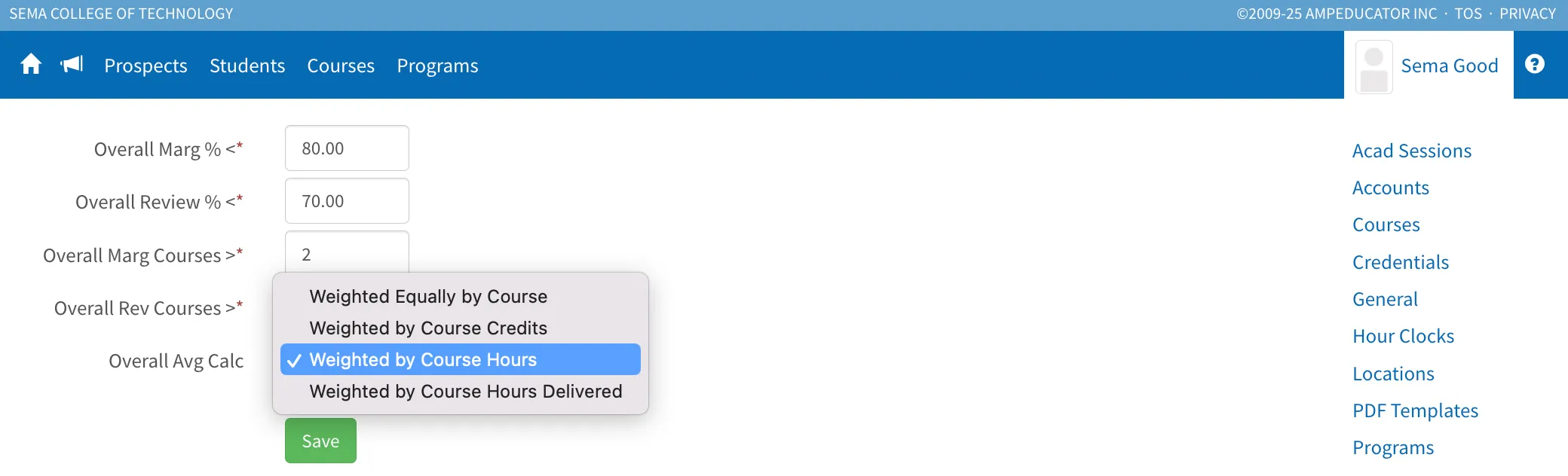
Instead of treating every course equally (Equal Weighting), this method calculates a student's overall attendance based on each course’s total scheduled hours. Longer courses contribute more to the final attendance average.
Equal Weighting assumes each course has the same number of hours, which often isn’t true. For schools where course lengths vary, Weighted by Course Hours offers:
- More accurate attendance averages
- A fair reflection of instructional hours
- Better alignment with hour-based reporting or compliance requirements
Example: If a student attends 90% of a 100-hour course and 60% of a 20-hour course, Equal Weighting would average these to 75%. However, using Weighted by Course Hours, the calculation considers total instructional time, resulting in an 85% overall attendance rate. This provides a more accurate picture because the longer course naturally carries more weight.
Admins can enable this option in: Institution Config → Students → Attendance → Student Attendance Defaults
Expanded SSO Integration Options 🚀
Release Date: December 4, 2025
The SSO Integrations area in ampEducator has been expanded to provide greater flexibility and security when connecting external authentication systems. Institutions can now configure both External Identity Providers (OAuth) and Connected Applications (OIDC) directly within Institution Config → General → SSO Integrations.
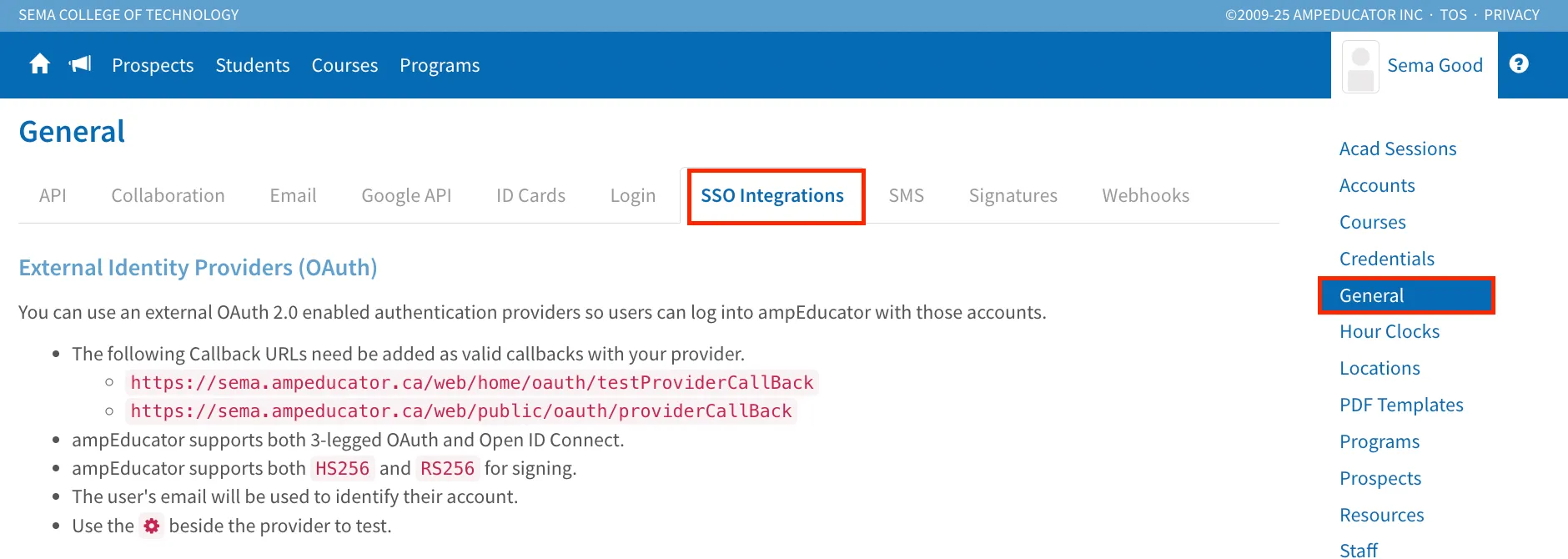
External Identity Providers (OAuth)
This section allows institutions to connect external OAuth 2.0 or OpenID Connect services, enabling users to log in to ampEducator using existing credentials such as Google or Microsoft.
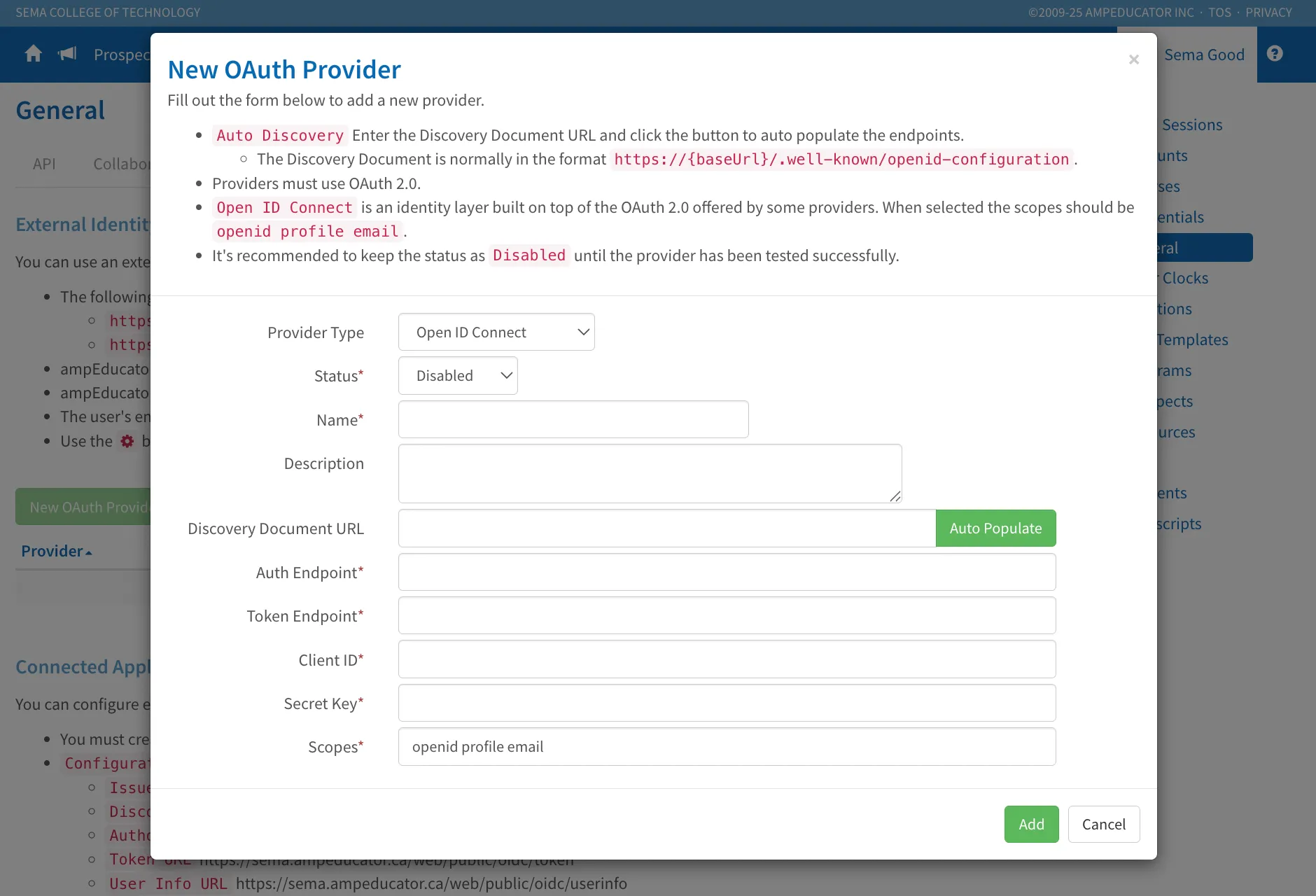
Setup has been simplified with support for discovery URLs, automatic endpoint population, and the ability to test connections directly from the configuration page. Administrators can now easily manage multiple login providers from one centralized location.
Connected Applications (OIDC)
A new Connected Applications section has been added, allowing ampEducator to serve as an identity provider for external systems—such as Moodle—using OpenID Connect standards.
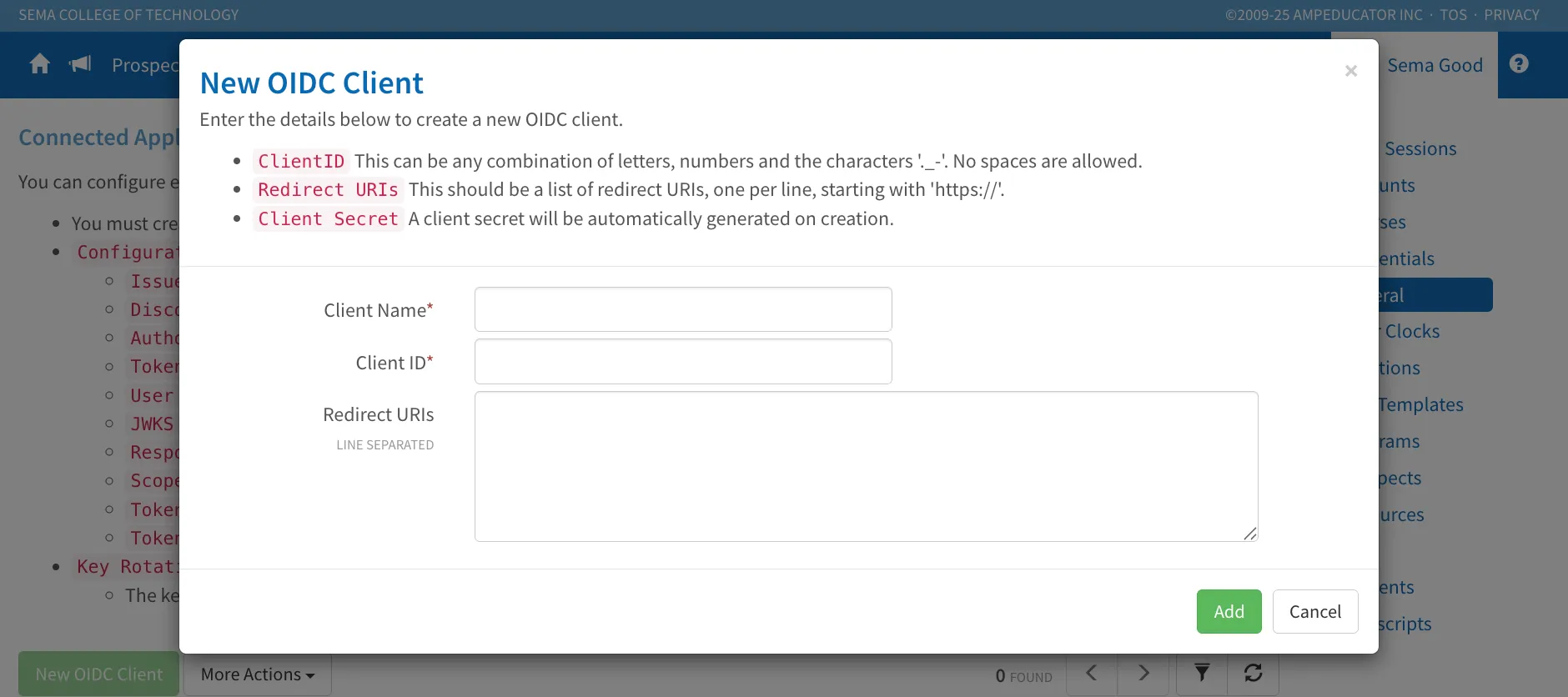
Each connected application includes its own Client ID, Secret, and list of redirect URIs. Administrators can also manually rotate signing keys at any time under More Actions → Rotate Keys to maintain security and compliance.

These updates give institutions greater control over authentication and simplify single sign-on management across platforms.
New: Student Attendance Messages
Release Date: December 1, 2025
We’ve added Student Attendance Messages to help students better understand their attendance performance directly in the Student Portal.
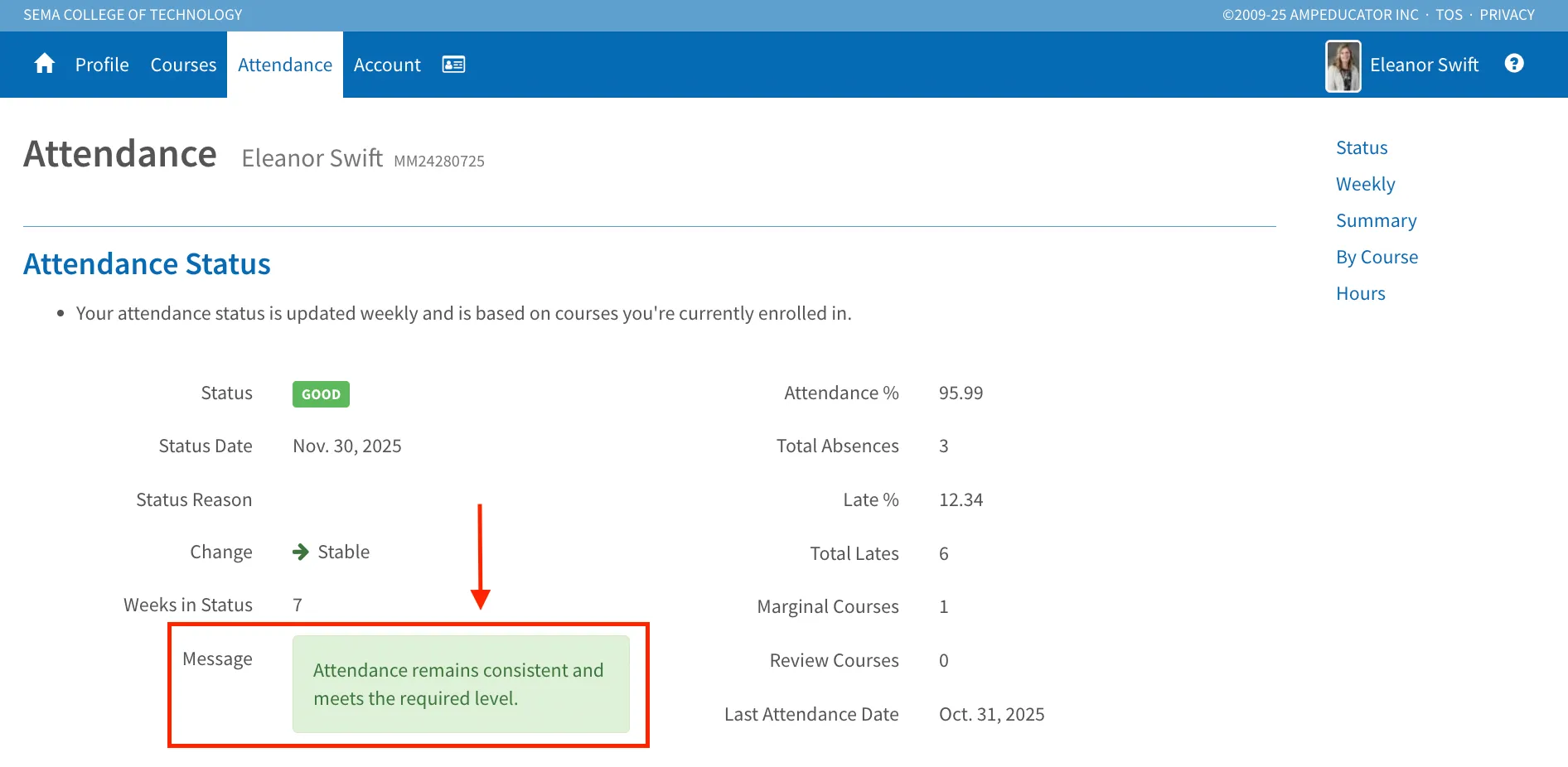
These messages automatically display based on each student’s current attendance trend, whether attendance is improving, stable, or declining, and update weekly according to their most recent attendance data.
Administrators can configure these messages in Institution Config → Students → Attendance to align with institutional communication preferences.
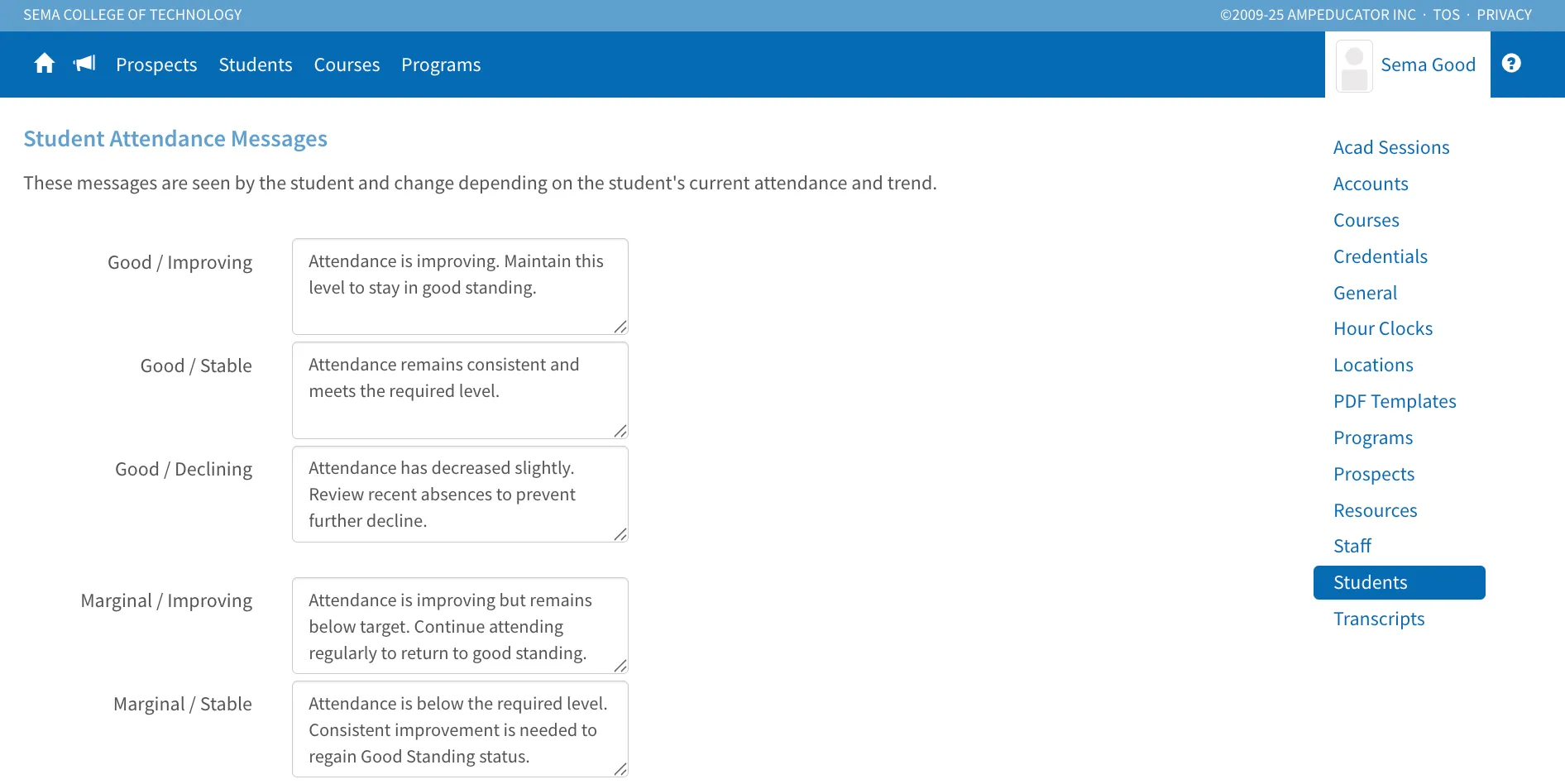
Key Benefits:
- Keeps students informed about their attendance status in real time
- Encourages proactive improvement before falling below thresholds
- Reduces support inquiries by providing clear in-portal feedback
This update enhances transparency and supports better student engagement with attendance tracking.